
What is the Daman Game App?
This is an Android application that lets users access the gaming platform through an APK file. It is designed to offer a seamless gaming experience without searching the web every single time. Once you install the app, log in to access your account and get access to your game account.
The Daman game app includes games such as Colour Prediction, Lottery, Slots, Sports, Fishing, and Crash-style Games. The app also has other features such as a referral program, gift codes, transaction history, and account settings for easy account management.
The game app is easy to use for both new and old users, and regular updates ensure bug fixes and seamless performance.
App Specifications
| Specifications | Details |
|---|---|
| App Name | Daman App |
| Category | Online Colour Prediction Gaming Platform |
| File Format | APK |
| Operating System | Android 6.0 and above |
| Minimum RAM | 3 GB or higher |
| Minimum Storage | 100 MB or higher |
| Language Support | English and Hindi |
How to Download the App?
The Daman Game APK download takes only a few minutes. There are two easy methods to download the APK file. Follow the steps given below for an error-free download.
Method 1: Through the Download App Option
Visit the Official Website: Open your mobile browser and go to the official website. Please wait until the homepage is fully loaded before continuing.
Tap the Login/Register option: On the home page, click on Login or Register. After opening the page, click the back arrow in the top-left corner to enter the main game screen.
Click on Download App Option: Scroll down the Daman Game screen to find the Download App option. Tap to view the APK download page.
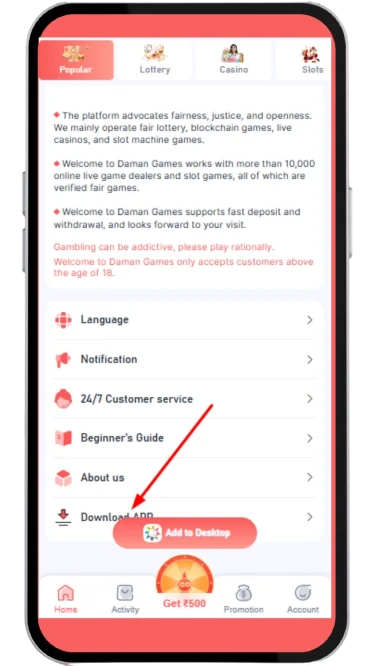
Choose an Installation Option: Choose Quick Installation or Complete Installation as per your preference. Both options install the latest version of the app.
Allow the Download: Tap Allow if your browser asks for any permission. Wait until the download is completed before closing the browser.
Method 2: From the Add to Desktop Button
Go to the Official Website: Use your Android browser to open the site and wait for the homepage to load properly.
Access the Main Game Screen: Tap on Login or Register, then tap the back arrow to get back to the game screen without logging in.
Tap "Add to Desktop": Click on Add to Desktop, which is situated in the bottom navigation bar. Clicking on it will display the download page.
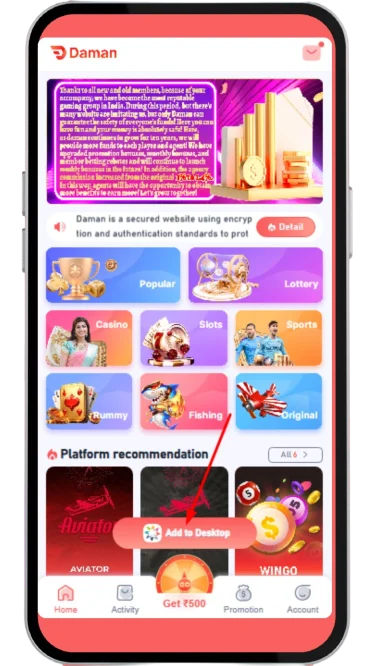
Choose Your Download Type: Select between "Quick Installation" and "Complete Installation" and proceed with completing the APK download.
Download the APK File: Your browser will ask you if you are sure you want to download; tap Download or Allow, depending on your browser. The file will start downloading. Once it finishes, you can proceed with the installation.
How to Install the Daman APK?
After completing the APK download, the next step is the Daman app install process. This is necessary because the app is available as an APK file instead of through the Google Play Store.
Open your phone's Downloads folder or tap the download notification to locate the APK file. Make sure the file has finished downloading before opening it.
Tap the APK file. If prompted, go to Settings and enable Install from Unknown Sources (or Allow from this source, depending on your Android version).
Return to the Downloads folder and tap the APK file again. Then, select Install to begin the installation process.
Wait for the installation to finish. Do not close the installation screen. It usually takes 3-4 minutes, depending on your device and browser.
Once the installation is complete, tap Open to launch the app. Sign up or log in with your account details to start using the app.
Tips Before Installing the Game App
Many users make small mistakes during installation that cause problems later. Following the simple tips given below will ensure a seamless experience and protect your device from potential issues:
- Verify Internet Connection: Download on a stable 4G/5G or Wi-Fi connection. If the connection is poor, it may result in a corrupted download file.
- Download from Official Website Only: Always download from verified sources to prevent fake apps and malware. Don't rely on third-party download sites as they may pose data risks.
- Free up Storage: Uninstall unnecessary applications and files to save space. This will help to avoid installation problems and ensure the app runs without any issues.
- Disable VPN Temporarily: A VPN may have an impact on downloads and installations. Deactivate it during the installation.
- Keep Phone Updated: Upgrade your Android OS before installation to ensure compatibility and security.
Daman APK vs Browser Version
Both the APK and browser versions let you use the gaming platform. The experience is different based on your device and what you prefer. Here is a comparison table to help you choose what works best for you:
| Feature | Daman APK | Browser Version |
|---|---|---|
| Installation | Requires APK download and installation | No installation required |
| Performance | Optimised for faster loading and smoother gameplay | Depends on the browser and the internet speed |
| Access | Launch directly from the home screen | Open through a mobile or desktop browser |
| Notifications | Supports app notifications for updates | Limited browser notifications |
| Storage | Requires device storage | No storage needed for installation |
| Best For | Android users who want the best performance | iPhone users and those who prefer browser access |
Is the Daman App Safe?
Before downloading and installing the app, many users ask about its safety. The application can be used safely if downloaded from the official website. Avoid installing the Daman APK files from third-party websites, as they may contain outdated or modified versions.
Make sure to set a strong password for your account and avoid sharing your login details or OTP with anyone. Treat the platform as a source of entertainment rather than a way to earn money.
Common Download & Installation Problems
Sometimes, while downloading and installing the APK, users report issues. If you have also encountered some issues like a failed download or app freezing, the solutions are listed below:
| Problem | Solution |
|---|---|
| APK Not Downloading | The Internet connection might be causing the issue. Try reloading the webpage and downloading the APK file again from a verified website. |
| Installation Blocked | Make sure you enable "Unknown Sources" from the Android device settings before starting the installation process. |
| App Won’t Open | Restart your phone and check if you have installed the latest version. |
| Insufficient Storage | Free up some space by deleting unused apps or clearing the cache, and restart the installation. |
| Download Interrupted | Use a stable mobile or WiFi connection during the download. Don’t close the browser until the file downloads successfully. |
Quick Tip: If you're still experiencing the problem even after following the above steps, download the fresh APK once again from the official source or contact customer support for help.
Conclusion
The download process is straightforward when you understand the necessary steps and install using the official website. Daman app offers a choice between Quick Installation and Complete Installation.
Before you click Download, make sure that your mobile device is compatible with the newest APK file. If you are someone who prefers quick access, then the APK version is perfect for you, as you don't have to search through a browser every single time. If you run into download or installation issues, use our troubleshooting tips to fix errors. After you install the app, sign up for your Daman account and start using the app.